

Before stunning web images, dynamic graphics and videos, and appealing transitions, you need to prioritize user experience (UX) on your small business ecommerce website. User experience needs to be your primary focus when creating, redesigning, and updating your small business ecommerce website.
Why?
Because your customers and target audience don’t care if you just redesign your website. They’ll care that you made their experience less stressful, more informative and beneficial for them, and less time consuming. Small business online shopping can oftentimes be stressful if the website is not modernly designed, updated, or offers the features and benefits that most online shoppers have come to expect.
If you want your small business ecommerce store to gain traffic and keep it, design it for user experience and interaction. Afterall, they’ll be the ones using it on a daily basis.
Check out the following comprehensive list of ecommerce tips you can use for your small business!
How to Receive and Interpret Customer Feedback
Your first step in designing your small business ecommerce website for user experience is to determine your customers’ and visitors’ opinions of your existing site.
There are a few great methods you can use to figure this out:
1. Create and send out a brief survey to your existing clients
You can send a survey link in a personalized email, or directly message your customers and business contacts on social media with the same link. I would suggest using a survey creation tools like Survey Monkey, Google Forms, or Type Form to create more engaging, user friendly, and modern surveys for your customers. You also want to make sure your survey has only a few questions that won’t take long to complete. Make sure you state that fact in your email or message as well.

2. Check user behavior on your current website
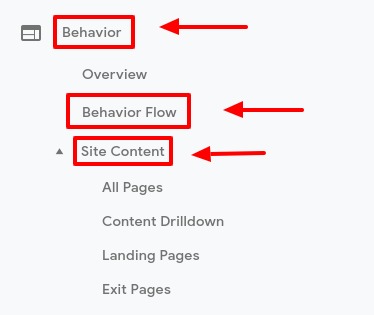
If you want to know what specific pages you can improve on your new website, you need to know how your web visitors are interacting with them now. Use Google Analytics to help you out! In Analytics, there are tabs where you can see web visitor behavior flow through your website, your most popular landing pages, and your most popular exit pages. Analyzing and understand this data can help you determine if certain web pages are serving your visitors’ needs or just slowing them down.
Here’s how to find those tabs in Google Analytics:
1. Once you log into Google Analytics, click the “Behavior” tab on the left hand side navigation. Under the “Behavior” tab, click on “Behavior Flow”. “Behavior Flow” will pull up a graph showing you the most popular pages bringing visitors to your website, how they navigate through other web pages, and what pages they end their navigation path on.
2. Back under the “Behavior” tab on the left hand side navigation, click on “Site Content”. Under “Site Content”, there will be four options: “All Pages”, “Content Drilldown”, “Landing Pages”, and “Exit Pages”. Take a few minutes to review all the different data points in each of these sections. Analytics provides valuable metrics like bounce rate, time on page, page views etc so you can make informed decision about your best and worst performing pages.
Ecommerce User Experience Essentials
Once you have an idea of specific pages that you may need to update, or general changes you want to make, there are some essential functionalities you need to make sure to include in your ecommerce website. If you want to compete as a small business retailer, your ecommerce store needs to meet today’s online buying and shopping standards.
The most important elements of your ecommerce store are:
– Convenience
– Speed
– Assurance
– Accuracy
– Options
– Experience
Convenience
Your information and product page structure needs to be easy to find and navigate for your visitors and customers. Many times, if a visitor is searching through your product pages, they’re either looking to buy right away or they’re doing research to determine if your product/ service is right for them. You don’t want to lose a customer due to poor ecommerce website structure. People shop online because it’s supposed to be easier than hopping in the car and driving to your location. Use a simple and clean design!
Pro Tip: Make sure your ending page is no more than 3 clicks away from the user’s starting page. The quicker and easier it is for a customer to find your products, the faster they’ll convert.
Speed
Fast loading and processing pages are a must when it comes to small business ecommerce websites. Your visitors aren’t going to sit around and wait for your product pages to load. They’ll leave and look to find it elsewhere. According to a KISSmetrics infographic, 40% of online visitors will leave a webpage if it takes more than three seconds to load! And because of continuing dominance of smartphones, you need to make sure your ecommerce website is optimized for mobile as well.
Assurance
We’re all familiar with the infamous Facebook and Uber data breaches that occurred. Hacking, customer data selling, and information breaches are all too common in our modern era. Because of this, your small business needs to take precautions when handling sensitive customer information.

The professionalism of your small business ecommerce website design should reassure your visitors, you should take care to use validated CRM management tools, and make sure to state why you need specific customer information and what you plan to use it for.
Accuracy
Your customers expect their shopping experience to be fast, easy, and informative.
There’s nothing worse than a potential customer’s buying processes being slowed down by incorrect information on your small business website. This is where optimization work comes into play. You need to make sure your physical location is properly listed, your shipping process is updated and accurate to accommodate for weather, product delays, backorders etc, and your product pages are properly optimized for the correct product keywords.
Options
Even though as a small business your resources may be more limited than a bigger business, your customers still expect to have options when they buy from you.
Offer options not only in your product types such as color and year model, but you should also offer options when it comes to payment and pick up or shipping options as well. Some customers may want to pay with credit, but others may want to use Pay Pal or Apple Pay. If you’re selling higher end products, consider offering a scheduled payment plan. Your customers may also vary in where they would like to receive their purchase, so the more options you have, the better!
Again, these options should be implemented to better serve your customers and visitors by making it easier for them to buy from your ecommerce store.
Experience
Part of the convenience and fun of shopping online is the experience. Make your ecommerce store visually appealing, easy to navigation, and useful for your customers. Take some cues from bigger business ecommerce stores to figure out what your visitors prioritize in their shopping experiences.
You could offer a special product coupon, a recently viewed section where the searcher can look back at what they viewed, a chat support service, a shipping progress tracker, a recommended product list etc. Your goal is to ensure your visitors become customers and are happy when they’re completing their purchase on your small business ecommerce site.
In Conclusion
The best ecommerce tips for small businesses is to optimize for user experience. Use the tips above to determine how best to design your ecommerce store for your unique customer base so you can increase conversions, revenue, and customer satisfaction rates for your small business!
 Blog
Blog Case Studies
 Infographics
 Free Comprehensive Analysis