

As we head into another New Year, everywhere you turn are posts and stories reminding you to look back at the past to see how much you’ve changed and grown. There are “Year In Review” articles and clips, the 10 year photo challenge has taken over social media, and and several businesses (both large and small) have had recap and growth meetings in the first few weeks of January.
As a specialty small business, it’s crucial that you take the time to review your progress, data, changes, and analytics from last year. If you want to properly set growth expectations, implement new marketing and sales strategies, outline a functioning small business budget etc., you need to know how your small business performed the previous year. Without that data, you’re New Year plans will be left up to guesswork, which can end up being disastrous for your small business success.
If you’ve yet to use Google Analytics for your small business, the New Year is the perfect time! At Cazbah, your dedicated IMC (Internet Marketing Consultants) will help you set up, track, manage, and report on your small business website’s metrics in Google Analytics and help you navigate any tricky circumstances you may run into. If you’re feeling ambitious and want to set it up yourself, look no further!
Below, I’ll walk you through the 4 steps to set up your own Google Analytics account for your specialty small business so you can start tracking and reporting on the success of your small business website today!
Let’s jump right in!
How to Create a Google Analytics Account for Small Business
Using Google Analytics for small business helps you track just about anything you can image that happens on your small business website. You can gain better insight into what type of searchers are coming to your website, what type of phone they’re using to search your mobile site, what your most popular web pages are, how much referral traffic you’re getting from social media, and so much more! Google Analytics isn’t a tool you might want to use for your website, it’s a tool you absolutely need.
To begin, you need to have a Google account created. If you have a gmail account or a YouTube account, you already have a Google account.
1. Create an Account
Go to google.com/analytics and click “Start for Free”. That’s right, like most other website tools provided by Google, Google Analytics is also free for you to use!
2. Assign a Property
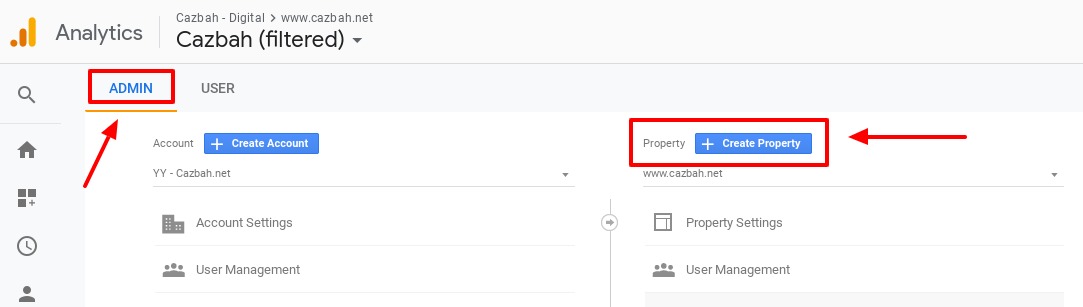
Assign a property (this is your specialty small business website). To do this, sign in your Analytics account and click on the “Admin” tab on the bottom left navigation. In the “Property” tab, click the button that says “Create Property”. In the new window, make sure to select either “Website” or “Mobile App”. Fill out the rest of the boxes as they pertain to your small business website and click “Get Tracking ID” when you’re ready to continue.
3. Set up a View
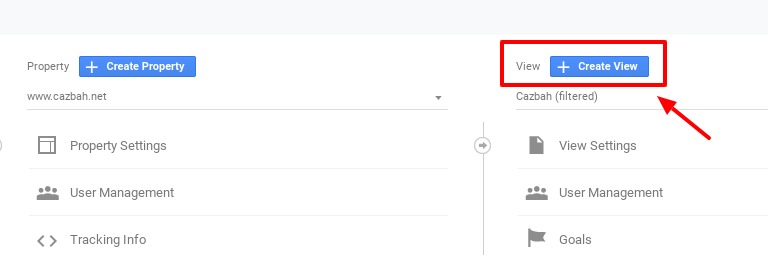
Set up a reporting view to see your website data. Go to the “Admin” tab again. Make sure you have the correct Account and Property selected that you want to add the reporting view to. Move to the “View” column and click the “Create View” button at the top. Just like above, select “Website” or “Mobile App”, select a name for your new view, and then click “Create View”. You can create multiple different views so you can see specific groups of your data, so your name should pertain to the type of data within your new view.
4. Insert the Tracking Code
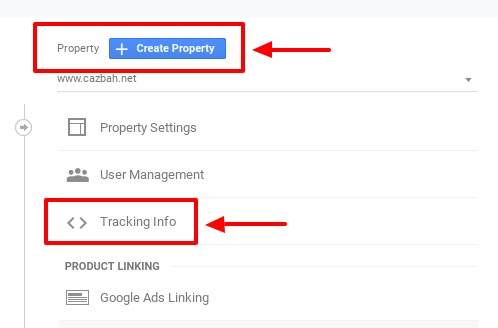
Insert the Google Analytics tracking code so Analytics can start receiving data. Google Analytics supplies you with a tracking code that you need to include on any page of your website that you want data from. Go to the “Admin” tab and move to the “Property” column. In the “Property” column, click on “Tracking Info” and then “Tracking Code” from the drop down menu that appears. Select the whole code that appears in the box and add it to every page on your website you want to track. You want to add this tracking code snippet to the beginning of each page right after the <head> tag of each web page.
Once you finish adding the tracking code snippet to your web pages, Google Analytics should immediately start importing data. These instructions will allow you to set up the basics of Google Analytics. Once you understand these preliminary steps, then you can continue to set up and use some of Analytics’ more advanced features.
In Conclusion
Make sure you’re taking advantage of the website analysis tools that are available to you. Using Google Analytics for small business will help you make more informed and accurate marketing and sales decisions moving forward. Using the tutorial and steps above, you’ll be able to create your own Google Analytics account for your small business so you can get a jump start on your sales and marketing strategies for the new year! Let’s make the New Year even better than your last one!
 Blog
Blog Case Studies
 Infographics
 Free Comprehensive Analysis