

If you’re going to make it online, you need to make sure you’re optimizing your website for valuable keywords. That’s no big surprise. But, where most people start to fall off is checking the effectiveness of their keywords. Are your pages being found under the keywords you chose to optimize for? Do you know how to use Google Search Console?
If you’re target audience is searching for you or the products/services you provide, make sure you’re optimizing your website for the keywords they use, not just the terms you use internally at your business. Google Search Console helps you do that, and I’ll tell you how you can master this tool to make sure your target customers actually find your site.
Boost Your Traffic With Google Search Console
Google Search Console actually has a very thorough list of features and applications for you to use. But, for the specific purposes of this article, I’m only going to discuss the tools used to evaluate your website’s traffic from search. Within Console’s search traffic section, there’s a few areas you can use from “search analytics” to “mobile usability”.
If you have time to browse through them all, I would highly recommend it, so you can get a better feel for how the different metrics come together. Google Search Console is a free tool, so if you want a free and broad overview of your website performance, this is a good option to keep on your roster. Optimally, you should have both a Google Analytics and a Google Search Console account set up (and linked!) for a comprehensive overview of your website’s performance.
In terms of specific keyword optimization though, your efforts should be focused on mastering the search analytics tool. Search Analytics tells you what keywords or queries your website or a specific webpage are found under. It breaks down the keywords used to find your page, the average rank of that keyword, number of clicks, the click through rate (CTR), and the number of impressions. There are also several filters you can apply to your results like “countries”, “devices”, “search type” etc.
If this all seems confusing, the step by step process below will help you out:
How to Use Google Search Console
First off, you will need to set your main domain as a property in the “home” tab of Google Search Console. I would also suggest bookmarking the page once you set it up, so you can easily find it. You’ll quickly see what a valuable tool this will be in you on-page SEO efforts. Once you do that, then you can get to work!
Step 1: Once you get to Google Search Console (click the link HERE), select “search traffic” on the left hand side. When you do you’ll see “search analytics” appear directly beneath it. Click that option.
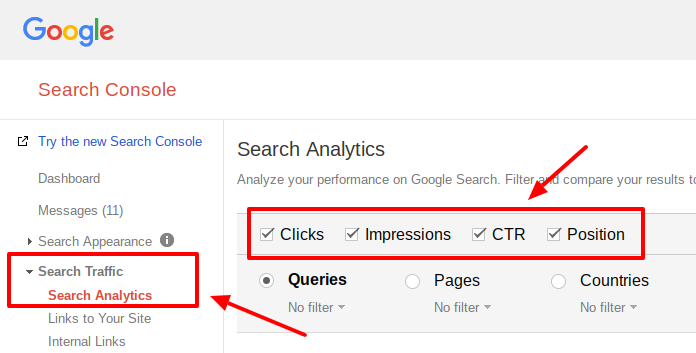
Step 2: Check each box for “clicks”, “impressions”, “CTR”, and “Position” and select any additional filters you want in the row directly below it.
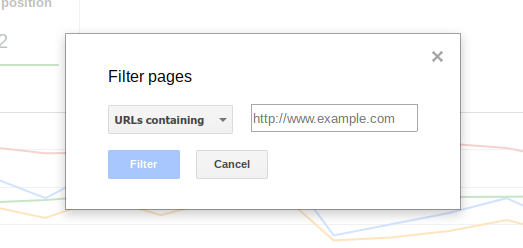
Step 3: If you want to search a specific URL (for a website or a webpage), select the little drop down arrow under “pages” and click “filter pages”. Simply add the URL in the box provided and select “filter” to see the results.
As a nice bonus, Google Search Console also provides a comparison graph illustrating how all your metics compare to each other. So if you’re a visual person, you can scroll over it and get the same data.
There is also a newer version of Google’s Search Console available as well that you can check out. The link to the new version appears in the top, upper left hand side of Google Search Console and is still in it’s beta version. It’s branded as a sleeker, easier to use platform to manage your optimization needs. But, one clear benefit of the new platform is the ability to download and share various data reports. That way you can send valuable data to other team members or departments easily to maximize your SEO strategies.
Until all the updates and work on the newer version are complete, you will be able to switch between the two. But I suggest you stay ahead of the curve and take the time now to master the newer version as well.
Choosing the Right Keyword
You may think that just because you select and then optimize a page, it’ll only be found under the one keyword. Wrong! Google’s page crawlers process all the content on a webpage when they index it, seeing how it all fits together. So, you’re page might not even rank at all for your chosen keyword, but something else entirely!
It’s actually a good thing that your page is found under multiple different keywords or maybe different keywords than you optimized for entirely. Search engines, especially Google, only want to give searchers the best results possible, so sometimes that means ranking your web page under different keywords than you originally intended. They’re doing some of the heavy lifting for you actually.

By using Google Search Console, you can find out what keywords your page is actually ranking for, then you can go back and properly optimize your page to ensure that it ranks well and remains competitive. The more keywords your website ranks for, and the better optimized it is, the more people will see it and potentially become qualified leads for your business.
Crawlers are smart, and because they use hundreds of different qualifiers to determine rank, they can determine how users are searching and what webpages best answer those search queries. That’s why it’s extremely important to go back and check periodically on how a page is ranking and what it’s ranking for. If you’re wondering why your amazing article or information page isn’t getting the web traffic you want, it could just be a simple keyword misunderstanding.
In Conclusion
If you’re taking the time to create content on your website, don’t cut the process short by not double checking your pages’ keyword rankings. If you know how to use Google Search Console, you can see how your pages rank for certain keywords and learn how to better optimize them to get more traffic.
 Blog
Blog Case Studies
 Infographics
 Free Comprehensive Analysis