

Have you ever gone to a website, not found what you were looking for and decided to do a search within that site? Most of us have. It is called a “site search” and it’s a popular way new visitors find what they’re looking for. The ability of your website to deliver an accurate search result is critical in keeping that visitor on the site and continuing through your sales funnel.
But what happens if a visitor can’t find what they’re looking for? They’ll leave! Do you know what your web visitors are searching for or what searches aren’t providing any results? If your website is going to generate sales for your business, you need to know what keywords your web visitors and prospects are actually searching for! You need to know how to view your site search metrics in Google Analytics.
Keep reading to find out how!
Why Site Search?
First off, why do people conduct site searches if there’s already a site navigation and CTAs? Here are some likely reasons:
- The website design doesn’t show them how to intuitively navigate your site
- Maybe you sell many products, and visitors are looking for specific SKUs/product numbers. It is just quicker to do a search
- The visitor may be ready to buy and already knows what they want
- Perhaps a visitor is looking for a product/service/ or other specific information
- If they’re searching on their smartphone, mobile sites can sometimes be difficult to navigate. Site search provides an easy way for visitors to find what they want
Site Search Tracking in Google Analytics
How do you know what your web visitors are looking for during a site search?
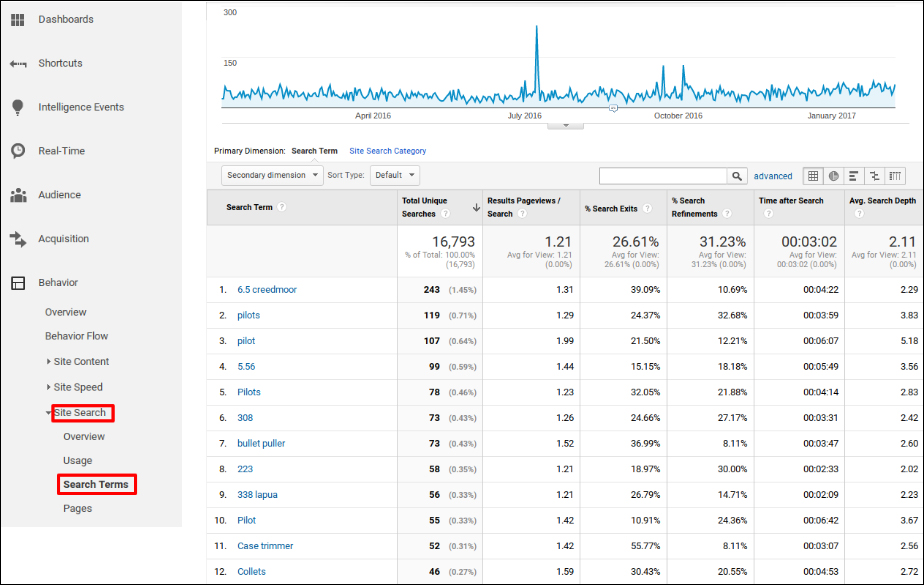
Google Analytics actually provides a site search function that allows you to see what kind of searches are being made on your site. You can see what search terms are most popular on your site, so you can better understand what your visitors are looking for.
Typically when I show this report to my customers, they connect with it right away. They see patterns that often make sense. Many of those patterns map back to the bullet points in the previous paragraph. Below is an example of what a typical site search report in Google Analytics looks like.
Site Search Solutions
Knowing what information your prospects and website visitors are looking for is crucial. But, the second half of that equation is making sure their searches are actually returning the results and information they want.
Below are some common issues with site searching and how you might deal with those issues:
The Frequent Search
Sometimes we see visitors search the same keyword or variations of it frequently, but not getting any results.
When we see this issue, there are a couple easy fixes you can make:
- Give the product, topic, or page they’re searching for a more prominent position on the site so visitors can easily navigate to it
- Consider re-titling a web page that has the information a searcher is looking for
- Advertise the product, service, or information the site search corresponds to or send out a customer email campaign that’s focused on the keyterm(s) that’s being searched for
These solutions will give your audience easy access to the information they’re most interested in without the hassle of searching for it themselves. The goal of your website should be to deliver as much useful information as easily as possible to your site visitors.
Missing Information
It’s not uncommon to find visitors not getting a result when they do a search. Within Google Analytics site search report, you’ll also be able to see if a search isn’t returning any results at all.
It shows what keywords are not showing a result when a visitor does a search. This is often a clue that visitors can’t find the product, service page, or information they want.
You can click on the search term that isn’t returning any results to see what that search is. Moving forward, there may be room and opportunities to develop more in depth content on your site that includes those keyterms your audience is searching for.
Technical Difficulties
Sometimes we notice that searches are being made but the search function on your site is not returning the proper result. This can be an indication that there is something wrong with your search tool or that your web pages are not categorized properly. It could also mean the searcher is misspelling your product or service.
There are often easy solutions to fix these issues:
- If your website was built using WordPress, consider adding “categories” and “tags” to your web pages
- Do research to determine why and how your visitors are searching for a product/service/page using a certain spelling or terminology. Consider changing your terms to match there’s
Work with your Internet Marketing Consultant to find a solution that works for you so your visitors will get the results they expect.
Conclusion
Analyzing your site search Google Analytics is a quick and easy way to get a better understanding of how visitors are interacting with your site. It can also be a great resource to provide a much stronger and more positive user experience on your website. So take a look at your site search report today! You won’t be disappointed.
 Blog
Blog Case Studies
 Infographics
 Free Comprehensive Analysis